
UX Roundup: OpenAI Usability | Integrated Software | Seedance 2 vs. Kling 3 | Grok Imagine | Increasing AI Use

Summary: OpenAI to emphasize usability | Integrated software | Comparing multi-shot AI video models | Grok’s image generation model receives an upgrade | AI use up in the workplace, and employees who use AI now worry less about losing their jobs to AI

UX Roundup for April 6, 2026 (Nano Banana 2)
OpenAI Wants AI Usability
OpenAI’s press release announcing a $122 billion funding round last week (at a valuation of $852 billion) contained an interesting statement: “As models become more capable, the limiting factor shifts from intelligence to usability.” As an old usability freak, I can only approve of this insight, late as it may be.
I would have advised OpenAI several years ago to emphasize the usability of AI much more than they have done traditionally. Maybe they could have avoided the Sora debacle if they had conducted more up-front research on user needs in AI video.

OpenAI will supposedly prioritize usability. Let’s hope so. (Nano Banana Pro)
The press release states that OpenAI’s new strategy is to build a unified AI superapp. (Maybe along the lines of the pre-AI WeChat superapp that’s been so successful in China.) They claim that “Users do not want disconnected tools. They want a single system that can understand intent, take action, and operate across applications, data, and workflows.” I have not seen user research to support this claim, but the WeChat experience does indicate the benefits of a unified superapp relative to the fragmented app experience on mobile devices outside China.
In general, integration often benefits user experience. If nothing else, a single integrated UI usually has better consistency, unless it’s produced by truly incompetent designers who make each segment disconnected from the rest. An integrated system also offers a more seamless user experience, without the clunky handoffs that come with combining disparate applications.
Historically, integrated systems succeed by drastically reducing interaction cost. Before Microsoft Office conquered the market, users juggled WordPerfect, Lotus, and Harvard Graphics, each inflicting idiosyncratic menus and proprietary formats. Combining these tools eliminated the friction of context switching. Users learned a single mental model, and data interoperability became seamless, allowing users to embed a financial chart into a document without jumping through complex export-import hoops.

An integrated user experience can support a smoother workflow. (Nano Banana Pro)
These exact historical benefits apply perfectly to the current, highly fragmented AI landscape. Today, using generative AI for a multi-step project is a miserable experience reminiscent of 1980s software. If a user wants to analyze a dataset, generate a chart, and draft an executive summary, they often have to bounce between three different tools. Each AI requires its own distinct prompting style and has zero memory of what happened in the other window. The user is forced to endlessly copy and paste outputs, essentially acting as a manual bridge to connect isolated models. This constant articulation work kills productivity and alienates mainstream users who do not have the patience to become expert “prompt engineers.” (Nor should they have to, as I’ve argued for years.)
If OpenAI actually builds a properly integrated superapp, these legacy usability victories will transfer beautifully to the AI era. The most crucial advantage of a unified AI system isn’t just a shared graphical interface, but a shared, persistent context. In such a system, the AI maintains a continuous understanding of the user’s overall intent, project history, and personal preferences across every task. A user wouldn’t have to write a three-paragraph prompt explaining their goal from scratch every time they switch from text generation to data analysis or image creation. The system already knows what they are trying to achieve.
But persistent context also creates a new requirement: inspectability. Users will not trust a superapp merely because it is convenient. They need to see what sources the AI used, what assumptions it carried forward from earlier tasks, and how to correct or reset that context when it drifts. A unified system that is opaque can be more dangerous than a fragmented system that is merely inconvenient.

Current AI tools lack the benefit of classic integrated software — and elephants — of having a persistent context that transfers from one step to the next, even when using different AI models. (Nano Banana Pro)
Ultimately, an integrated AI ecosystem can finally deliver on the holy grail of AI usability: shifting the burden of work from the human back to the computer. If the AI inherently understands the broader goal, it can draft the text, pull the data, and orchestrate the workflow in one fluid environment. If OpenAI’s designers can pull this off without succumbing to the massive feature bloat that typically plagues superapps, their new focus on practical usability over raw algorithmic intelligence might just be their smartest move yet.
Integrated Software
In 1985, I worked at the IBM T.J. Watson Research Center, which at the time was one of the world’s 3 top user interface research labs. My main project that year (together with Robert L. Mack and others) was a field study of how business professionals used integrated software, which was a new innovation at the time.
You can download the full paper about this study. (To its credit, IBM Research maintains an excellent archive of its old papers.)
We identified 6 types of integration in 1985:
Application integration (easy access to multiple applications, using results of one program in another, such as using numbers from a spreadsheet to build a business graph).
Media integration (working with multiple media formats together).
Interface integration (uniform interaction with the different parts of the system).
Systems integration (making use of multiple computer systems working together).
Documentation integration (the system itself helps you use it, by making user assistance part of the user experience).
Outside integration (interfacing with the “real world” outside the computer).

The 6 forms of integration. (NotebookLM)
Here’s a summary of what we discovered about how these forms of integration were used in the workplace. These conclusions remain relevant to OpenAI’s project and other efforts to build integrated AI.
Our field study of business professionals, based on 54 surveys and 12 in-depth work analysis interviews, found that integrated software was underutilized because software vendors focused on the wrong problem. They optimized product integration (making tools fit together) when users actually needed task integration: support for the work they were trying to do.

Product integration is a design strategy that makes all the basic tools fit together. Here, helmet, sword, and shield all in one. Conversely, task integration designs an integrated user experience based on what users want to do. Here, not just raiding the English, but bringing the loot home. (NotebookLM)
The Heterogeneous Reality of the Workplace
Software designers often build for a mythical, uniform user base operating in pristine environments. The real world is messy and wildly heterogeneous. We found professionals juggling an average of five different software packages, often cherry-picking standalone tools rather than relying on bloated integrated suites.

Designers may dream of a uniform user base, but in reality, people differ dramatically in needs and skills. (NotebookLM)
Furthermore, user expertise varies drastically. While every office has a few “gurus” who eagerly dive into complex systems, the vast majority are discretionary users. They want to know as little about the computer as possible. If a system lacks approachability or requires reading a massive, intimidating manual, these professionals will exercise their veto power. They simply refuse to use it, either abandoning the task entirely or delegating it to specialized support staff.

Many teams and workplaces have a “guru” user, who may have a regular job title, such as lawyer or Viking warrior, but who loves learning about the newest technology and adapting it to local use. Most employees are not like that! (NotebookLM)
The design implication for AI is straightforward: build for discretionary users first and experts second. Give beginners a forgiving default path that works with natural language and minimal setup. Then let power users expose deeper controls (reusable workflows, reference assets, parameter settings, and debugging views) only when they actually need them. Progressive disclosure beats feature dumping.
The Power of “Satisficing”
When users do interact with software, they rarely seek the optimal technical solution. Instead, they rely on a behavioral strategy called satisficing: finding a method that is just “good enough” to handle the immediate problem.

Satisficing: once you find a satisfactory solution that’s good enough, people tend to keep using this approach even if it’s suboptimal. Sticking with what you know is easier than finding something new. (NotebookLM)
For example, we frequently observed users forcing complex data into simple spreadsheets instead of using a proper relational database. Is a spreadsheet the right tool for complex queries? No. But from a usability perspective, it is a highly rational coping mechanism. The spreadsheet is familiar, and the cognitive overhead required to learn a new system is perceived as an insurmountable barrier.
This creates a secondary usability disaster: the migration trap. Users predictably outgrow their initial ad hoc solutions as data accumulates, yet they remain trapped. The industry provides almost no graceful migration paths from introductory interfaces to mature, advanced tools.
A modern AI product should therefore support graduated migration. A novice may begin with one-off chats, then save a good interaction as a template, then turn that template into a reusable workflow, and only later into a full agent. If every increase in power requires users to abandon the old interface and learn a new one from scratch, most of them will never make the climb.
Coping With a Non-Ideal World
System designers build software for an idealized environment. In reality, users were constantly thwarted by absurdly trivial limitations: missing cables, lack of memory, or small screens that cause a frustrating “workspace squeeze.” Users also suffer from fundamental interface flaws, with over half complaining about low-level inconsistencies like function keys arbitrarily changing meaning between applications. Software must be designed for graceful degradation, delivering productivity gains even when operating in less-than-perfect, sub-optimal configurations.
While many of the specific problems that plagued our users 41 years ago have (slowly) been solved by industry standards such as universal USB-C cables, new practical problems invariably rise to take their place.
The Catastrophic Overhead of “Small Things”
Perhaps the most glaring usability failure of integrated software was its inability to handle the micro-tasks of daily office work.
Professionals constantly need to move tiny pieces of information, like pulling a single statistical number from an analysis tool into a report. The computer-based integration in 1985 was horribly heavy for this. The procedural interaction cost of selecting, copying to a clipboard, switching applications, and pasting was simply too high.
Consequently, for integrating many “small things,” the most efficient tool was still a physical piece of paper. The user writes the number down on a notepad and retypes it. When a piece of paper beats your computer system, your user interface has failed. Paper offers absolute flexibility and near-zero cognitive overhead. Software must mimic this frictionless data transfer.
This matters even more for AI than it did for office suites. The biggest gains will often come not from spectacular end-to-end autonomy, but from eliminating dozens of tiny frictions: carrying one number into a slide, one decision into a task list, or one instruction from yesterday into today’s work without making the user repeat it.
The Usability Bottom Line
To design effective tools for knowledge workers, we must stop obsessing over product integration: making proprietary code modules talk to each other. Users do not care about your software’s technical architecture. We must focus on task integration, minimizing the mismatch between the system and the user’s actual workflow. Design for the busy, pragmatic professional whose primary goal is getting the job done with minimum effort.
Comparing Multi-Shot AI Video Models: Seedance 2 vs. Kling 3
I used two different video models to make the same test scenes from Shakespeare’s “Richard III”: Seedance 2 and Kling 3. These are currently considered the world’s best AI video models. Both are Chinese, and both offer multi-shot sequences, where the AI composes a longer segment from shorter clips with different camera angles.

I set up a video model battle comparing Seedance 2 and Kling 3, having both generate the same scenes from Shakespeare. (Nano Banana 2)
I just used Seedance 2 with great success for my music video based on Hamlet (YouTube, 4 min.), but I used the omni-reference ability of Seedance for this video, meaning that I gave it character reference sheets to show how each character should look, as well as style reference images to lock in the 3D CGI style I had chosen for this project. I even gave Seedance specific renders for each scene to show it how I envisioned the action in each scene.
I took a stricter approach for this project. To see how these models perform unassisted, this Richard III experiment relied purely on text-to-video generation. I provided only scene descriptions, dialogue, and brief outfit notes, forcing Seedance and Kling to generate the visuals, character voices, and lip-syncing entirely from scratch.
Result: This small experiment clearly showed why most creators say that Seedance is the world’s best video model. (We can hope that Google will catch up with Veo 4, whenever that’s released.)
Kling 3 produced attractive scenes, but Seedance 2 won on cinematography, acting, and set design, especially in the Tower of London segment, where Clarence is being detained for his own “protection.” Seedance also delivered slightly better lip sync and fewer pronunciation errors.
Both models mispronounced some of Shakespeare’s lines, particularly archaic English, such as the famous opening line, “Now is the winter of our discontent.” Kling 3 completely garbled “discontent,” whereas Seedance 2 pronounced it “discomfort.”
Since both video models are Chinese, it may not be surprising that they have trouble with rare English words. By contrast, ElevenLabs pronounced “discontent” correctly in the closing avatar narration, suggesting that video generation is advancing faster than speech quality in these end-to-end systems.

As video models improve their visual and cinematic capabilities, sound is lagging behind, especially in foreign languages. (Nano Banana Pro)
Ultimately, “best video model” will not be judged on a single dimension. Creators care about cinematic quality, character consistency, prompt adherence, editability, speech intelligibility, rendering speed, and cost. Seedance may be the clear winner in this Shakespeare test, but another model could still be the better production choice for ad work, fast iteration, or tightly controlled brand content.
Grok Imagine Update
Grok has released a new version of its Imagine image and video model. The main touted improvement is higher image quality. I still rank Nano Banana 2 higher overall, but Grok is improving at an impressively high rate, with the next release already in the works and said to be only a few weeks away.
It’s always great to see competition, and there are already use cases where Grok Imagine is superior because it’s less censored than Google.

User testing as a modern video game. (Grok Imagine)
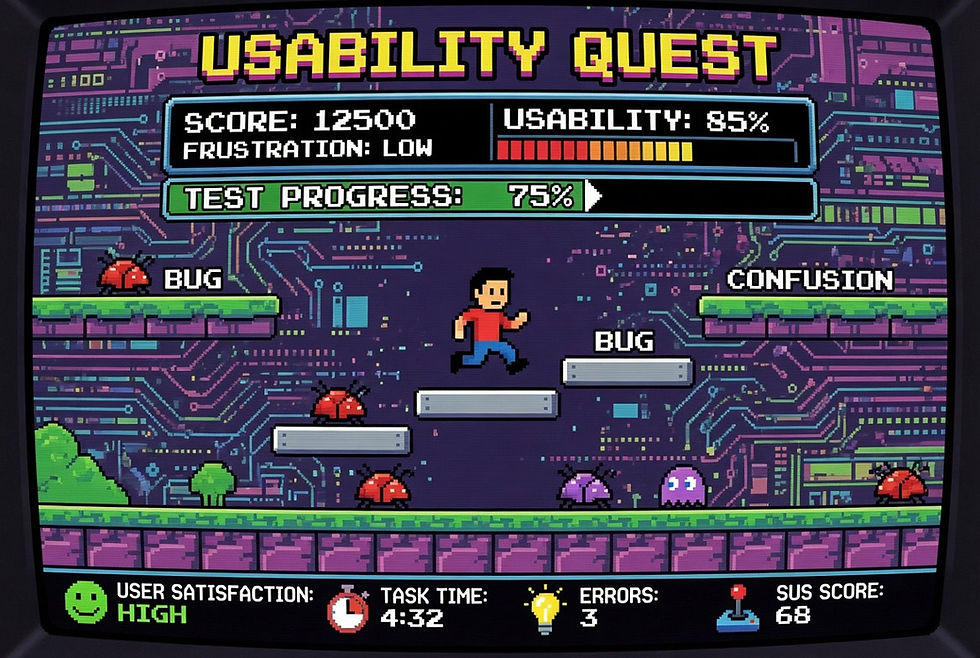
User testing as a classic video game. Note how Grok included a SUS score (SUS = System Usability Scale). This demonstrates that Grok’s image generation is integrated with the main AI model and its world knowledge. (Grok Imagine)
Increased AI Use in the United States
This is not a big surprise, but the latest consumer survey shows that Americans are using AI more. TD Bank surveyed 2,504 Americans in February 2026 and found that 78% of Americans now report using AI-enabled tools in their daily lives, with two-thirds saying they are more proficient than they were last year (67%).
Use is even higher in the workplace, with 83% of employed respondents indicating they use AI-powered tools or applications to support their work. 68% of the people using AI for work believe AI makes them more productive in the workplace.

AI is changing from a novelty to a normal, expected core component of the workplace, according to the new survey. (NotebookLM)
Another notable result is trust. AI is now trusted “a great deal” or “somewhat” by 62% of Americans, up from 50% a year earlier. That puts it ahead of news media at 58%, though still far below “Your Bank” at 85%. Trust is improving, but AI has not yet achieved institutional-level credibility.
Shadow AI is still real: In the same survey conducted in March 2025, 41% said “I use AI at work without my boss knowing about it.” Worryingly, 38% said that they have “exaggerated my ability to use AI when applying for my job.” Hiring managers beware! When hiring new staff, you need to give them a test to see how strong their AI skills actually are.
Whereas in last year’s survey, many people worried about AI taking their jobs, this year, 68% of survey respondents who use AI to assist with work stated they are less worried about AI taking their jobs than they were a year ago. 71% said that AI gives them an advantage over others in similar roles. (NotebookLM)
The most common AI uses at work in the 2025 survey were writing or editing (46%), conducting research (37%), and analyzing data (35%). The least common uses were recruitment (11%), optimizing supply chains (13%), and developing products and services (16%). I would say that AI is great at helping with product and service design, but maybe the low score reflects how few people perform this function in the first place.
Respondents were asked whether they would prefer to receive a number of services from AI acting alone, from a human supported by AI, or from a human acting alone.
AI beat humans for two topics: The highest AI margin was for “provide show or movie recommendations,” where 35% preferred AI alone, compared to 27% who wanted human-only recommendations. (38% preferred AI-augmented human advice.) The second-highest AI margin was for “improve knowledge and/or skills around a specific topic,” where 30% preferred AI alone, 25% preferred humans alone, and 46% preferred AI-augmented humans.
For elementary school education, my own current preference is for the curriculum to be taught in a fully individualized manner by AI, but with human teachers in the classroom to serve as role models and keep order. For business professionals, on the other hand, AI is getting to the point where it’s probably the best way to learn many job skills.
The worst AI score was for “help diagnose health/medical problems,” where only 12% preferred AI alone. In contrast, 43% preferred humans alone, and 45% preferred AI-augmented humans. (This despite much research showing that AI often surpasses human doctors at medical diagnosis.)

For now, users are mostly interested in getting help from AI alone without any human involvement for lower-stakes decisions, such as what show to watch. For higher-stakes decisions, they still want a human involved but are mostly open to AI augmentation for that human. (NotebookLM)
The deeper pattern is not merely that AI wins low-stakes tasks and humans win high-stakes tasks. People are more willing to accept AI alone when the decision is reversible, and nobody needs to be clearly accountable for the outcome. They want humans in the loop when the costs of error are consequential, emotional, or socially exposed. That is a useful design rule for AI products: the higher the stakes, the more the interface must support oversight, explanation, and recourse.
Another low-AI category was outfit selection: for “help you pick out an outfit,” 22% preferred AI alone, 45% preferred humans alone, and 33% preferred AI-augmented humans. My guess is that people treat clothing as a social and expressive judgment, not merely an optimization problem. Even as AI gets better at visual taste, many users will still want a human mirror in the loop.

Outfit advice from AI? Not yet. (NotebookLM)
This highlights a crucial UX threshold: the divide between utility and identity. Users are increasingly eager to outsource utilitarian, low-stakes tasks (like data analysis or movie recommendations) to AI, but they fiercely protect domains tied to self-expression, personal taste, and social signaling. Choosing an outfit isn’t just a computational problem; it’s an act of human identity. Designing AI for these identity-driven tasks requires shifting the UX paradigm from “efficient automation” to “collaborative inspiration.”
And that may be the real theme of this week’s roundup. AI is moving out of the novelty phase and into the workflow phase. As adoption spreads, the winners will be judged less by raw model capability and more by whether they preserve context, reduce interaction cost, and earn enough trust to be used for consequential work. In the long run, usability is not an afterthought to AI capability. It is the differentiator.


