
UX Roundup: Design Guidelines Changing for AI | AI Anxiety | Toggle Switches | Erdős Problems | Glanceable Monitoring

Summary: Design guidelines held steady for 30 years but are shifting with AI | Users who are anxious about AI use it more, not less | A toggle is a light switch, not a form field | What are the Erdős problems and why are they relevant for AI? | An ambient monitoring interface with glanceable feedback on agent progress cut errors in half

UX Roundup for August 3, 2026 (GPT Image 2)
30 Years of Design Guidelines: UX Shifted from Cognition to Communication
Design guidelines represent layers of HCI history: each list preserves what the field worried about when that layer hardened. Nikolaos Avouris and Christos Sintoris from the University of Patras in Greece just performed this kind of guideline archaeology on 51 principles from 5 influential guideline sets published between 1986 and 2019, including my 10 usability heuristics. Their conclusion: the classic sets exist mainly to protect users’ limited cognition, whereas the newest set (written for AI products) elevates communication between user and system to equal rank. The 3-page paper was presented last month at the ACM EICS conference, conveniently held on the authors’ home turf.
The lineup: Shneiderman’s Golden Rules (1986), my usability heuristics (drafted with Rolf Molich in 1990, current version from 1994), the UXPA Principles for Usable Design (2005), the ISO 9241-110 dialogue principles (2006), and the 18 Guidelines for Human–AI Interaction that Saleema Amershi and 12 Microsoft colleagues published in 2019. The authors coded each principle by the human capacity it chiefly serves: cognitive, perceptual, psychological-motivational, communicational, or socio-cultural. The raters? LLMs. The team screened models for run-to-run stability, kept 5, and merged their repeated ratings into panel verdicts through weighted majority voting, with 3 human HCI experts checking a 15-guideline subset. Human–LLM agreement on the primary label was 60%.
The headline result: cognition dominates the 4 classic sets, claiming 38–57% of principles, but falls to 23% in the human–AI guidelines. Communication moved in the opposite direction, hitting 38% in the AI set: parity with cognition for the first time. The psychological dimension persists across every layer (8–33%) but mutates along the way. In 1986, it meant user control over a tool; in 2019, it means supervising a system that acts on your behalf, with controls to dismiss, override, and correct it. Socio-cultural concerns (fairness, bias, accountability) surface mainly in UXPA (18%) and the AI guidelines (12%). Perception? Nearly extinct at 0–10% across all 5 sets.

Share of principles in each guideline set whose primary dimension was cognitive vs. communicational. (GPT Image 2.)
Two results made this old heuristics author smile. First, rater agreement was highest for my heuristics (α = 0.794) and lowest for the human–AI guidelines (α = 0.532): each of my rules cues one concern, whereas the AI rules bundle several. The crispness was engineered. The 1994 revision of my 10 heuristics came from my factor analysis of 249 usability problems, tuned so that each heuristic explained a distinct cluster of real-world failures. Guidelines are user interfaces for designers, and a rule that trained evaluators can’t apply consistently fails its own usability test. Second, my heuristics scored 32% communicational, the highest of any pre-AI set. Visibility of system status is feedback. Error messages are dialogue. The field’s communication turn didn’t start with chatbots; it already carried weight in 1994.
Some caveats, even though the findings flattered me. A corpus of 51 principles is small. The human validation (3 experts, 15 guidelines, 60% primary-label agreement) is thin support for an all-LLM rating pipeline. And the 5 sets differ in genre as well as era: a compact heuristics list, an ISO standard, and Microsoft’s domain guidance aren’t strictly comparable, which the authors concede. Thus, treat the exact percentages as directional. But the direction rings true, matching what anybody shipping AI products sees daily: the hard problems are trust calibration, explanation, and handing control back and forth.
Three things to do with this finding:
Keep running heuristic evaluations on AI products, then add a communication pass. Cognition still accounts for 23% of AI guidance, and the classic usability sins remain sins. Also ask: does the system explain itself, expose its uncertainty, and let users override it? Intent-based interaction demands all of the above.
Write your design principles the way I learned to: one concern per rule. If 5 expert raters can’t agree on what your guideline means, neither will your design team. Test your design-system principles for codability before publishing them.
Don’t let perception vanish from your standards. Near-zero perceptual scores suggest visual wisdom is hiding inside “cognitive load.” Somebody still has to specify contrast and grouping, because the Gestalt principles never stopped mattering.
Guideline sets, this study reminds us, are historical records as much as practical tools. The newest stratum documents the moment when the interface became a conversation partner. My prediction for the next core sample, around 2036: guidelines that read like management training for supervising AI teammates, covering delegation, performance reviews, and trust repair. Start practicing.


(GPT Image 2)
AI Erases Job Boundaries: Designers Do Everybody’s Job, but Hardly Anybody Else Does Design
OpenAI classified 800,000+ work-related ChatGPT messages and found that 44% of occupation-specific AI use concerns tasks that historically belonged to a different occupation. Designers cross boundaries the most: 35% of their AI prompts tackle other fields’ work, while design tasks almost never appear in other workers’ AI use. Plan your career, and your company’s AI strategy, around broader roles, not automated versions of the old ones.
What OpenAI Did
Caroline Chin and Alex Martin Richmond from OpenAI’s Economic Research team analyzed a random sample of more than 800,000 work-related messages from U.S. ChatGPT users in 8 occupation groups: customer experience, design, engineering, finance, HR, legal, marketing, and sales. (Occupations came from the users’ ChatGPT Business role data.) Each prompt was matched to a work activity in O*NET, the U.S. Department of Labor’s database of the tasks historically associated with each occupation, and then compared with the sender’s stated job to determine whether the request stayed inside his or her own field. Read the full report for the details.
The tally: 62% of work prompts are generic chores shared by all jobs (writing emails, the eternal killer app), 22% fall inside the user’s own occupation, and 17% cross into somebody else’s. (Percentages sum to 101% because of rounding.) Strip out the generic filler, and 44% of occupation-specific AI use is boundary crossing. The authors call this task crossover.
The usual caveats apply: an AI request isn’t an hour of work, output quality goes unmeasured, and this is single-vendor telemetry. But usage logs reveal job evolution years before job titles and government statistics catch up, so I’ll happily take the data.
Task Imports and Exports
Think of each occupation as a country with a trade balance. Imports are the share of a group’s own AI prompts devoted to other fields’ tasks. Exports measure how often the group’s traditional tasks show up, on average, in everybody else’s prompts.

The import numbers look much larger than the export numbers, because imports are summed across all other occupations from which a job imports tasks. For example, 35% of what designers do with AI (beyond generic prompts) consists of tasks native to a non-design occupation. In contrast, the exports show how much the average professional in another occupation performs AI tasks from the exporting occupation’s domain. For example, the average non-designer has 1.7% of his or her non-generic AI tasks classified as design tasks (in addition to performing a number of tasks imported from other occupations).
Marketing and engineering are the great exporters: everybody drafts promotional copy, and everybody troubleshoots software. Financial number-crunching travels almost as well. And small firms cross more boundaries: among typical-volume users, the cross-occupation share is 19% in workspaces with 2–5 seats vs. 16% at 101+ seats. In a 4-person company, there’s no specialist down the hall, so the AI becomes the specialist.
Designers Run a Whopping Task Trade Deficit
Designers import the most (35% of all their work prompts are tasks from other disciplines) and export the least (design tasks average a mere 1.7% of other occupations’ prompts). Fully 75% of designers’ occupation-specific AI use falls outside design, with engineering and marketing tasks at 28% apiece. Designers use AI to code and to sell.
The import side is good news, and it confirms what I’ve preached for years: design sits between business and technology, so AI removes the wait-for-a-specialist delay (and cost) and lets a designer who prototypes in real code, drafts the campaign copy, and crunches the funnel numbers ship complete product work instead of handoffs. He or she becomes a full-stack product professional, which is worth more money.
Should designers read the puny export number as job security, since amateurs apparently aren’t grabbing design work? Not so fast. This study only sees ChatGPT text messages, whereas design crossover by non-designers happens in image generators, website builders, and Figma-class AI tools, which are invisible in this dataset. Don’t mistake a measurement artifact for a moat. Multimodal design agents will mature within 2–3 years (my prediction), and then design amateurs arrive in force.
Thus, the durable career asset is the reverse of production: evaluation. Producing outside your field is now cheap, while judging quality remains expensive. As I argued in “AI Turns Competence into a Commodity,” competence has become a commodity, so sell judgment.
What Companies Should Do
Three strategy guidelines follow from the data:
Provision AI horizontally. Boundary-crossing gains appear among ordinary users in every function, not just the engineering department. Rationing seats to the “obvious” AI roles forfeits most of the value.
Redesign workflows around task bundles, not job descriptions. When a designer can write the copy and a salesperson can run the analysis, many handoffs become waste. Smaller, broader teams will beat bigger, siloed ones. (Job architectures based on O*NET-style history will drift ever further from how work actually gets done.)
Install expert review. Nearly half of specialist-flavored AI work is now done by non-specialists who can’t fully judge the output. That’s a training problem, an accountability problem, and above all an AI product design problem: interfaces should scaffold the visiting amateur by explaining jargon, exposing assumptions, and flagging uncertainty, instead of assuming domain expertise that 44% of specialist-task use demonstrably lacks.
Adam Smith launched the division of labor in 1776 with his famous pin factory, where each worker performed one narrow task. AI now runs a reverse Adam: tasks flow across occupational borders tariff-free, and the workers who prosper will be aggressive importers. Import everybody’s tasks and don’t worry when they in turn import more of your legacy tasks. Profit from the one thing AI can’t commoditize: your judgment.


Alice and Zimo explain the new OpenAI data in cool wash style. (GPT Image 2)
AI Co-Creation Lessons from Structural Design
Researchers watched 3 expert designers co-create a building with AI under hard physical constraints. All 3 changed the design midstream and kept flipping between talking, sketching, and direct manipulation. Both behaviors hold lessons for AI products far beyond architecture.
Structural engineering is the rare creative field where you can’t ship a hallucination. A team at ETH Zurich (Ricardo Maia Avelino and colleagues) has published Creativity from Friction, a paper for the ICML 2026 Workshop on Human–AI Co-Creativity. Their term is constrained co-creation: human and AI jointly exploring alternatives under the discipline’s constraints. 3 experts in architecture, structural engineering, and parametric modeling each designed a multistory building with an AI 3D tool driven by a vision-language model. The task had strong constraints, similar to those a real client and a real plot of land would impose: a 50 × 25 × 25 m envelope, supports confined to a 40 × 15 m footprint, at least 5 stories and 2,000 m² of floor area, and a 10 m sphere (a future public plaza) that the building must not touch.
All 3 Experts Changed the Design Midstream
Nobody’s first concept survived contact with the model. One participant judged his or her inclined columns too long, found the fix crowded the supports, and redesigned twice into a simpler, still-feasible scheme. Another discovered, mid-session, a circular internal court running from ground floor to roof. Design intent evolved with the artifact, the pattern Donald Schön named reflection-in-action in 1983. The ETH team draws the right conclusion: AI’s central value in creative domains lies in expanding and navigating alternatives.
Now compare how most people use AI design tools today. Superdesign’s dataset of 210,759 real design prompts, which I dissected in a recent article, shows that only 40% of generations were refinements of an earlier design. Run the arithmetic: the average first draft received fewer than 1 revision, and since one project hogged a 396-deep refinement chain, my best guess is that the typical screen shipped with zero. One-shot design remains the norm when UX designers use AI. It shows in the usability of the screens they create.
The ETH authors contribute a distinction worth stealing: productive vs. unproductive friction. Unproductive friction: repetitive modeling, interface overhead, the drudgery of translating intent into geometry. Delete it. Productive friction: constraints that force you to compare alternatives and exercise judgment. Keep it. In creative work, friction is load-bearing.
Do We Still Need Low-Fidelity Middlemen?
Here’s my quarrel with the workflow. Participants first sketched on paper for 15–18 minutes, then iterated on an abstract structural model of joints, beams, columns, and slabs. That’s two intermediary representations before anything resembling a building. For UI design, I advise against such detours: AI produces a full-fidelity working screen as cheaply as a wireframe, and the higher the fidelity, the easier it is for users to evaluate the result and set the direction for the next round. People recognize what they want far better than they specify it, so let them navigate the latent space of possible solutions by reacting to concrete candidates rather than polishing abstractions.
Is architecture different? Partly, yes. The final product is a physical building, so every on-screen representation is an intermediary. And the stick-figure structural model carries the engineering semantics: load paths, spans, and supports that both human and AI must verify. (The paper’s demand for shared data structures readable by humans and AI alike is exactly right.) But the tool could pair that model with a cheap photorealistic render at each iteration: the designer judges the architecture while the model checks the physics.
Other domains sit in between, and I’ll confess my own practice. When I make AI videos, I climb a fidelity ladder: first I iterate on style descriptions, then on still images of locations and character looks, and only then animate. Video is the expensive rung, slow to generate and slow to review, so I settle every cheap decision on a cheap rung first. My rule: iterate at full fidelity unless the medium is costly to produce or hard to judge; then climb only as many rungs as it forces on you.
Users Flip Between Modes Constantly
The paper’s most instructive exhibit is Figure 4, a timeline of each session. All 3 participants alternated constantly among 5 interaction types: manual 3D drafting, text prompts to the AI, sketch-plus-prompt, mixed human–AI edits, and undoing AI mistakes. Nobody settled into a single channel. One participant praised sketching yet never used it (replicating repetitive elements is easier said than drawn); another found it “hard to put my ideas into words for the prompt,” demonstrating that my articulation barrier applies to expert users.
So the lessons for anybody building AI products: treat multimodality as core interaction, so users can switch between language, sketch, and direct manipulation mid-task without ceremony. Treat undo as a first-class AI feature; the authors coded “Human-Undo-AI” as its own interaction category because AI mistakes are routine. And mode preference varies by person, so don’t let average telemetry amputate a modality some users rely on.
Caveats: 3 participants, a prototype tool, and design changes all initiated by the humans. Fine. A qualitative study earns its conclusions; just don’t quote percentages, since there aren’t any.
Takeaway: Keep the Friction That Thinks
AI’s job in creative work isn’t to hand over a finished answer but to make the journey through alternatives fast, cheap, and visible. Strip out the drudgery, keep the constraints, iterate at the highest fidelity your medium affords, and give users every mode of expression they can grab. Buildings can’t be one-shotted. Neither can good design in any field. Friction is load-bearing, so don’t demolish it.
Anxious Adopters: AI Anxiety Predicts More Use, Not Less
Do worried users avoid AI? No, they use it more. That’s the standout finding in a new paper by Huachao Gao and Shrihari Sridhar of Texas A&M University’s Mays Business School, published in Customer Needs and Solutions. The authors surveyed a census-representative sample of 2,144 U.S. adults (120 questionnaire items, about 16 minutes per respondent) about their attitudes toward generative AI and their actual use of it. They package the results as the RISE framework: Relational meaning, In-context segmentation, Skepticism-usage paradox, and Equitable integration. Strip away the acronym, and the message is blunt: “AI users” form multiple segments, and averaging across them produces designs for a person who doesn’t exist.


Alice and Zimo explain the heterogeneity of users’ attitudes toward AI, using my Gritty Graphic Novel Noir comic style, which seemed appropriate. Compare with A&Z drawn in a more polished style at the end of this newsletter. (GPT Image 2)
Respondents refused to sort into pro-AI and anti-AI camps. The same sample somewhat agreed both that AI poses serious threats to humanity (mean 4.8 on a 1–7 scale) and that it’s a useful productivity booster (5.0). Beliefs formed a domain-by-domain portfolio: good for creativity and science, bad for jobs, privacy, and media manipulation. So a single “AI sentiment” score obscures more than it reveals.
Now the paradox. Respondents high in AI anxiety held darker expectations about jobs, education, creativity, and human control, yet the same anxiety predicted heavier engagement: more frequent use and more hours per day. Grudge use, in short: people keep working with a tool they resent because opting out feels costlier than the discomfort. And the arrow points the opposite way from what attitude research usually assumes: heavy use predicted milder concerns, while negative beliefs didn’t predict reduced use. Behavior shapes attitudes more than attitudes shape behavior. As Sridhar puts it in the university’s press release: “The most anxious people are often the ones using more AI.” His warning for employers who mandate AI fluency: you may be manufacturing compliance that masquerades as adoption.
Two more segmentation nuggets. Women worried more that AI damages human connections (4.9 vs. 4.3 for men), whereas men were more comfortable treating AI as a companion (4.1 vs. 3.6) and logged more use (1.7 vs. 1.2 hours per day). Meanwhile, Black (1.9 hours per day) and Hispanic (1.9) respondents reported more daily AI time than White respondents (1.4) despite lower average incomes, presumably because a free chatbot substitutes for the paid tutors, advisors, and lawyers that wealthier households can hire. Adoption resists compression into one number; the authors sensibly split it into access, intensity, and breadth.
Caveats: the data is cross-sectional and self-reported, and most effect sizes hover around a Cohen’s d of 0.3, which is considered a “small” effect (a “medium” effect requires d=0.5). Self-estimated hours per day deserve skepticism because people are poor judges of their own time use. The direction-of-causality claim needs longitudinal confirmation, which the authors concede. To their credit, they label their survey evidence “illustrative” rather than confirmatory. Refreshing honesty.
The findings extend my article on AI Stigma (February 2025), which reviewed studies where identical work received worse ratings when labeled AI-made and where half of employees hid their AI use from colleagues. The new paper opens with a 2025 WalkMe survey in which 78% of employees used AI tools their employer never sanctioned, and about half concealed that use. But this dataset adds a twist: stigma doesn’t suppress use. Aversion and adoption coexist inside the same user, a pattern that classic algorithm-aversion theory can’t explain. Usage is not acceptance.
What should you do about it? 4 things:
Stop reading engagement dashboards as applause. Daily active users can’t distinguish enthusiasts from grudge users. Track satisfaction by segment alongside usage; when usage grows while satisfaction sinks, you’re retaining hostages, and hostages bolt the moment a competitor pairs comfort with utility.
Design per context, not per user. Someone who loves AI for trip planning may refuse it when his or her money or health is on the line. High-stakes features need transparency, human escalation, and an easy opt-out, because acceptance earned in one domain doesn’t transfer to the next.
Make anthropomorphism optional. A chatty companion persona delights users who welcome AI as a social supplement and repels users who read it as a relational threat. Offer a plain tool mode.
Convert anxious adopters with calibrated trust. Show what the AI can and can’t do, keep users in control, and surface concrete evidence of personal benefit, such as time saved and errors caught. I gave the same advice in the stigma article; the remedy hasn’t changed, only the evidence pile has grown.
Toggle Switches: A 1917 Design Pattern Many Settings Screens Still Get Wrong
Definition: A toggle switch is a control that flips a single setting between exactly 2 states (on or off) and applies the change immediately.

One flip, two worlds: a toggle changes state the instant you touch it. No Save button, no ceremony. (GPT Image 2)
The name predates electricity: sailors in the 1700s fastened rigging with a toggle, a wooden pin pushed through a rope loop. The lever mechanism inherited the word, and in 1917 William Newton and Morris Goldberg patented the toggle light switch still on your wall. Apple’s iPhone (2007) redrew it on glass, and settings screens have flipped ever since.
Why Toggles Work: Flip It, See It
Users have operated light switches since toddlerhood, so a well-drawn toggle needs no instructions but runs on pure transfer training. It also delivers visibility of system status (my #1 usability heuristic since 1994): the knob’s position announces the current state, and the instant effect confirms the flip. No Save button. No waiting. A toggle is a light switch, not a form field.
Where Toggles Turn User-Hostile
But the pattern is fragile. Three sins recur. Ambiguous labels: does “On” name the current state or the action? Delayed effect: a toggle followed by a Save button breaks the light-switch contract; flipped it, nothing happened, trust gone. And color-only state indication, invisible to the 8% of men with color-deficient vision.
5 Design Guidelines for Toggle Switches
Reserve toggles for binary settings with instant effect. If the change needs a Save button, use a checkbox.
Label the setting, not the action. Write “Wi-Fi,” never “Turn on Wi-Fi”: the knob position supplies the verb.
Show state redundantly: knob position, track fill, and ideally on/off text. Never color alone.
Confirm the flip immediately. If a server round-trip forces a delay, show progress on the switch itself.
Make the target finger-sized: at least 1 × 1 cm. Fitts’s Law doesn’t care how sleek your switch looks.
The Erdős Problems and AI
If you follow progress in AI models, you’ve no doubt seen announcements that they keep solving Erdős problems. I got tired of hearing this without understanding what the Erdős problems are, so I made a comic strip to explain them. In general, it’s a neat trick to ask AI to draw a comic strip about complex issues you want explained in a lighthearted way.
Here my recurring characters Alice and Zimo make a detour into mathematics, this time drawn in Retro Cel-Shaded Graphic-Novel style. (I like to experiment with new cartooning styles for A&Z.)


Glanceable Agent Status Cut AI Errors in Half, at No Attention Cost
An ambient status window, spoken summaries, and a visual replay cut a computer-use agent’s surviving errors by 48% (from 2.51 to 1.31 per session) across 30 users, and nobody had to monitor the agent more to get it. Multimodal feedback usually adds noise; this time it subtracted work.
Agents run for minutes or hours, blowing past the 10-second attention limit I documented in The Need for Speed in AI, and we still track them through a scrolling chat log. That’s a car with no dashboard: to check your speed, you’re asked to read the engine’s diary.

The dominant agent UI (for now): read through a long scrolling list to find out what it did. (GPT Image 2)
Computer-use agents (CUAs) click and type through GUIs for minutes at a stretch while you attend to other work. Current products entomb the agent’s progress in a scrolling chat transcript, forcing you to Alt-Tab over and read prose to learn whether anything broke. That’s the transcript trap: the status information exists, but extracting it requires a context switch, which burns time.
Match the Channel to the Job
Ruei-Che Chang and colleagues at the University of Michigan and Adobe Research built Sidekick, a communication layer that frees agent status from the log. Their UIST 2026 paper tested it with 30 users who solved arithmetic problems (the primary task) while a Computer-use agent filled spreadsheets (the delegated task). The agent was rigged to inject 2 errors per column, so supervision mattered.

The study was calibrated to deliberately make two errors per spreadsheet column: enough to require users to supervise the agent, but not so much that they would give up on the agent. (GPT Image 2)
Sidekick assigns each communication job to the cheapest perceptual channel:
Ambient color for status. A peripheral window shifts from green through yellow and orange to red as consecutive agent errors accumulate. Color is preattentive: no reading required.
Lightweight sound for change. Spoken updates plus Foley clicks and keystrokes signal activity while your eyes stay on the primary task.
Spatial history for inspection. On return, a synchronized audio-visual replay walks through completed actions, with a color gradient marking which cells were touched most recently.
Interruption only for real decisions. After 8 consecutive failed actions, Sidekick pauses the agent and requests intervention. Otherwise it stays out of the way.
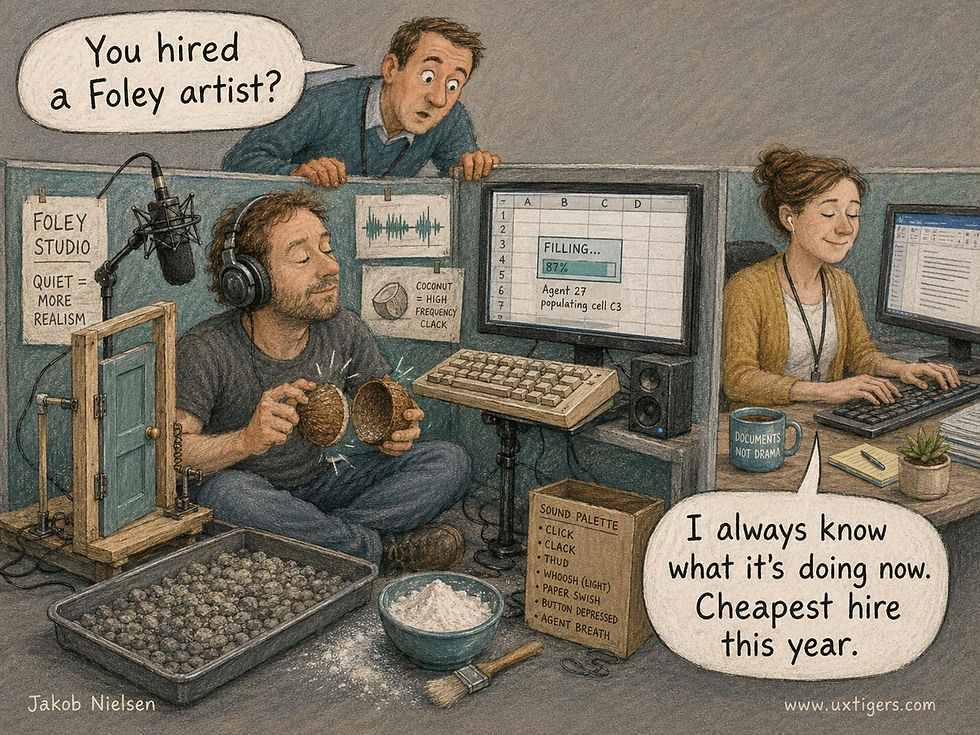
Foley effects are custom sound effects, originally added live during the broadcast of radio dramas and later during the post-production of movies. The most famous example is banging two halves of a coconut together to sound like galloping horses. (They’re named after Jack Foley, a sound effects artist at Universal Studios who popularized the technique during the early years of the talkies.) Limited use of sound effects can help users monitor AI agents without redirecting their attention from their primary task unless necessary. (GPT Image 2)
The results: Sidekick users scored 162 points, versus 148 for chat-only feedback and 139 for a peripheral text display. (Working alone: 115.) Agent errors dropped from 2.51 per session to 1.31. And here’s the rare part: task switches were statistically identical across conditions (p=.080), and time per check trended down, 8.6 seconds versus 12.8 for chat. Better oversight, same attention budget. The gains came entirely from the delegated spreadsheet task; arithmetic scores didn’t budge, so the richer feedback stole nothing from the primary work.

The ambient feedback didn’t divert the user’s attention from the primary work, so it was free in terms of attention. (GPT Image 2)
Peripheral text alone flopped: it didn’t significantly outperform working alone. Text in the corner is still text. Thus, the win comes not from relocating information to the periphery but from recoding it into signals a busy brain absorbs for free.
Users’ rated ability to catch errors in time to intervene jumped from 2.39 to 3.98 on a 5-point scale.

The simpler UI allowed users to catch more agent errors. Less is More, indeed. (GPT Image 2)
The catch: perceived workload was identical across all three agent UIs. As always, we must look at the hard data and not go by users’ subjective impressions to find out what works.
Build the Dashboard
Four UX guidelines to apply in your own agentic designs, extending the patterns in Slow AI:
Status goes ambient. Encode the agent’s state as color and thumbnail in the periphery, not as prose in a log.
Sound signals change, not content. A click you hear costs nothing to process; a paragraph you must read costs a task switch.
History goes spatial. Let people inspect what happened by looking, not by scrolling back through a transcript.
Interrupt only for decisions. Sidekick halts the agent at red and nowhere else. Everything below that threshold is the agent’s problem.

Active interruptions should be reserved for critical cases that require the user’s decision. (GPT Image 2)
Agent progress shouldn’t be trapped in a transcript. Follow these four guidelines, and one person can supervise more agents with less attention. That’s the whole promise of delegation.

We usually don’t need “the full report.” Avoiding this information overload will free up users to supervise more AI agents. Full details should be available on request, but only on request. (GPT Image 2)
Students Adopted AI Before Their Teachers, 90% to 61%
Ed-tech company Instructure (maker of Canvas) surveyed 1,125 U.S. educators, college students, and K–12 parents. Expected findings: 90% of college students use AI in class at least occasionally; only 61% of higher-ed educators do. 65% of students and educators alike worry that AI “can sound confident when it is wrong.” Yet 94% of students see at least one reason for optimism, and both groups prefer AI in supporting roles (finding resources) over consequential ones (grading).
The disgraceful finding from this survey is that just 11% of higher-ed instructors have received comprehensive AI training, and 41% received none.
Counterintuitive finding, though not a big effect size: AI use is more widespread among K–12 teachers (68%) than higher-education teachers (61%). Back when I was a university professor, we always thought of ourselves as the advanced ones. Apparently, academia's conservatism is impeding its adaptation to the modern world.
Final Thought of the Day


