
Intent by Discovery: Designing the AI User Experience

Summary: AI is not just a better chat box. It changes the user’s role from operator to supervisor, which forces UX to move from command-based interaction toward intent-based delegation, new usability metrics, orchestration layers, calibrated friction, and ultimately exploration-based interaction to clarify the user’s needs.
The most important thing about AI as an interface is not that it chats in natural language. It is that it changes the user’s role. AI changes computing from command-based interaction to intent-based outcome specification: the user states the result to be achieved, and the system determines the procedure.
In batch systems, the user submitted the whole workflow at once. In command-based systems, the user and computer alternated turns. In intent-based systems, the AI will infer and execute the workflow itself: You no longer tell the computer how. You tell it what you want accomplished, and it figures out the rest.

In command-based interaction, you strike every blow (click every icon) to gradually produce what you want, inspecting and correcting the intermediate work product at every step. (NotebookLM)

Intent-based outcome specification is similar to how a Viking jarl (chief) would order, “get me silver from an English monastery,” setting in motion a chain of events that starts with the weaponsmith making the shields and ending with the raid. He doesn’t have to specify these steps because the Vikings already know what to do. Using AI is the same. (NotebookLM)
An intent is not merely a wish expressed in natural language. A usable intent has at least three parts: the desired outcome, the constraints that bound acceptable behavior, and the delegation boundary that defines what the system is allowed to do. “Plan my Chicago trip” is underspecified unless the AI also knows the budget, the immovable meetings, and whether it may purchase tickets or only prepare options. Much of AI UX will therefore consist of helping users express not only what they want, but what the system is allowed to assume, optimize, and execute.
Intent-driven interaction shifts the locus of control rather than being a cosmetic change in input modality. While the GUI was a massive leap, the shift from typing commands to clicking them was much smaller than the AI-driven change in interaction design. As I pointed out when I identified intent-based outcome specification as the AI interaction modality at the dawn of modern AI in May 2023, this is an entirely new UI paradigm, and the first major shift in 60 years since we changed from batch processing to commands.
With a paradigm change in the UI, it stands to reason that we also need a paradigm shift in design and usability. What users do is being flipped, and UX must change with our users. AI changes the interaction grammar more than it changes any one screen: intent-based interaction is not just a new input method. It changes where decisions happen, who bears the cognitive load, and what “error” means.
In command-based interfaces (including GUIs), the human forms a plan internally and then executes it through controls. We’ve had the design goal to make the computer “transparent” precisely because it stays inside the user’s plan. This is one reason direct manipulation felt so powerful: operating on visible objects with immediate feedback let users focus on tasks rather than on the system.
In intent-based interfaces, the user externalizes part of the plan: they are no longer navigating, but delegating. The system must now interpret the goal, choose subgoals, schedule actions, acquire permissions, and handle exceptions. That pushes the system into a classic automation role, which human factors research has studied for decades: once automation takes over planning and action selection, the user shifts from operator to supervisor. Supervisory control has different failure modes than direct manipulation, and it demands different design safeguards.

Users are changing from doing the work (operating the UI) to supervising the work. (NotebookLM)
The winning system of the next decade will not be the one with the most aesthetically pleasing buttons, nor will it be the one with the fewest screens. It will be the system that best understands the human’s “job to be done,” autonomously selects the right tools on their behalf, clearly shows the user what is about to happen, and gracefully recovers when the user’s context is incomplete or ambiguous.
The Three Eras of UX Goals
UX design has never had one fixed goal. The goal has shifted twice already, and it’s shifting again.

The three goals of UX design: productivity, influence, and augmentation. (NotebookLM)
Era 1, Business Computing (1960–1995). The dominant applications were accounting software, word processors, payroll systems. The UX goal was productivity: help people learn the software faster, make fewer errors, get more done per hour. I used to tell clients that their training budget was a pork chop ready to be eaten by usability: a well-designed system could cut onboarding time in half.
Era 2, The Internet (1995–2025). The web shifted the UX goal to influence: get users to buy, subscribe, share, or scroll long enough to see another ad. This era leaned heavily on Robert Cialdini’s influence principles, such as reciprocity, social proof, scarcity. It also gave us dark patterns and infinite scroll. If you don’t pay for the product, you are the product.
Era 3, AI (2026 onward). The goal shifts again, to something harder to name: augmenting human existence. When AI handles execution of routine tasks, human energy is freed for imagination, judgment, and meaning-making. Doug Engelbart’s original vision was to “augment the human intellect.” That framing is too narrow now. The goal of UX in the AI era is to expand what humans can do and be, not only what we can accomplish in software, but what we can decide, imagine, and coordinate. Usability, therefore, shifts from removing friction in predetermined paths to expanding the range of viable paths, opening up possibilities we haven’t yet imagined.

AI can help us reach new heights and explore fabulous new vistas. Our design goal is no longer simply productivity or selling; it’s augmenting human existence. (NotebookLM)
When I present this 3-stage process of changing UX goals, I often get pushback from naïve designers who resent the implication that the main goal of their existence has been to manipulate customers. However, while becoming master manipulators might not have been the reason they embarked on a design career as idealistic youngsters, it was what they needed to do to thrive in the Internet business environment. The reason companies pay for design is to get customers to buy more and users to look at more advertisements.
In fact, one of the reasons I’m a big AI fan is that I never liked the business goals of Internet design. Of course, we’ll still need to persuade customers to buy. That will never change. But persuasion changes from manipulating humans by exploiting our many cognitive biases and weaknesses to providing clean information to AI agents that will do the buying.
The Short-Term Crisis: The Articulation Barrier
Current chat-based AI interfaces suffer from severe usability problems. The intent-based paradigm demands that users write out their problems as prose text. However, as repeatedly demonstrated by literacy research, about half the population in rich countries like the United States and Germany is classified as low-literacy users, with results being even worse in poor countries.
Writing new descriptive prose is cognitively more challenging than reading existing text. This creates an immense articulation barrier. It gives a massive advantage to the small fraction of the population with extraordinarily strong literacy skills. The very existence of “prompt engineering” advice is empirical evidence of this deep-rooted usability failure. If users are forced to learn arcane methods to tickle an AI into coughing up the right result, the interface fails human-centered design standards.

The articulation barrier is the problem of making your intent clear. It’s often hard to put something into words, especially if the goal is inherently nonverbal, like the shape of something, or if the user has low literacy skills. (NotebookLM)
In the short term, UX professionals must design to overcome this articulation barrier. We cannot rely on users generating perfect text from a blank canvas. Prompt augmentation and aided prompt understanding are two sets of design patterns to help users refine their intent for AI.

Style galleries are one of the design patterns for prompt augmentation. It’s easier to select something you like from a range of styles than it is to describe the style in words. (NotebookLM)
The articulation barrier is also a memory problem. If users must restate their preferences, recurring constraints, tone of voice, risk tolerance, and exceptions in every session, the interface remains unusable no matter how fluent the model sounds. A mature intent-based system, therefore, needs a visible, editable user model: a place where people can inspect what the AI believes about them, correct it, override it temporarily, or tell it to forget. In the AI era, memory becomes a first-class UX surface.
In the long run, we need a new approach to designing intent-based interactions.
Redefining Usability Metrics
Because the locus of control has reversed, the core usability metrics we have used for decades to evaluate UX must be completely rewritten. In the command-based paradigm, usability was measured by how efficiently a user could learn and execute the steps to accomplish a task. My ten classic heuristics assumed a human navigating a structured interface one step at a time.
In an intent-based ecosystem, the system acts probabilistically rather than deterministically. Usability is no longer judged by the elegance of the steps on screen, but by the quality of the machine’s understanding and the safety of its execution.
My classic usability heuristics will still hold, but must be reinterpreted. “Visibility of system status” used to mean: show progress through a sequence of steps the user chose. In an agentic workflow, it becomes: show what the system believes the user intends, what it is doing to satisfy that intention, and what it plans to do next, even when none of those steps were explicitly requested. “User control and freedom” used to mean: allow undo, cancel, and escape from a dialog or flow. In an intent-based environment, it becomes: allow interruption of an executing plan, allow correction of misunderstood intent, and allow safe rollback across multiple systems. Undo is harder when the system has already sent an email, booked a ticket, or modified a shared document. The old principle becomes more important, but also more expensive to implement.
The evaluation of a successful interface shifts:
From Discoverability to Intent Capture: Can the system accurately map a vague natural-language request to a highly structured machine action? Did it infer the goal, constraints, and priorities correctly?
From Error Prevention to Clarification Quality: Because we cannot disable invalid buttons to prevent hallucination, the metric shifts to how gracefully the system handles ambiguity. Does the system ask the right follow-up questions at the right time? The best clarifying question is the smallest intervention that prevents the largest mistake.
From “Time to Learn” to “Ease of Delegation”: Traditional UI learnability becomes less relevant when there are no menu hierarchies to understand and navigate. The primary metric becomes how comfortably a user can delegate a multi-step objective without fearing catastrophic failure. Time-to-correct becomes far more important.
From Execution Efficiency to Verification Efficiency (Evaluability): In command-based UIs, the user’s primary cognitive load was executing the task step-by-step. In intent-based systems, execution is cheap, but evaluation becomes the bottleneck. The usability metric shifts to how rapidly and accurately a user can verify that the AI’s output matches their actual goal. Interfaces must be optimized for “evaluability,” allowing users to judge quality and appropriateness (whether the AI’s work is fit for its external purpose) without painstakingly combing through every detail of the result.

Changing the usability goal from making it easy to make something to making it easy to evaluate the quality and suitability of what was made. (NotebookLM)
From Visibility of System Status to Execution Transparency: The system must project an accurate mental model of its operational plan before and during execution. It must show what it believes the user intends and what it plans to do next.
From User Satisfaction to Trust Calibration: Do users rely on the agent appropriately, neither over-trusting nor under-using it? Trust is no longer a soft emotional byproduct; it is the primary functional metric of an intent-based system. Trust calibration also depends on showing why the system preferred one plan over another. A good orchestration UI should be able to say, in effect, “I chose Plan A over Plan B because cost mattered more than speed,” or “This recommendation would change if your deadline moved by two days.” Counterfactual explanation is often more useful than a generic confidence score because it teaches users the model’s decision logic and shows where intervention would matter.

How much do you trust your AI agent? Do you want to give it your entire sack of silver, or just a coin or two? (NotebookLM)
These changes imply a different UX measurement toolkit. Time-on-task is less important when the human contribution is “say what you want” (and the AI then spends hours performing the task), but time-to-correct becomes a central metric. Traditional error counts must be split into user slips versus system misinterpretations. Satisfaction becomes increasingly bound to perceived agency: users can be pleased with outcomes but still feel uneasy if they cannot tell what happened or why.
The Triple-Layered Design Model
At first glance, “UI is dead,” since users will interact with AI agents more than they’ll be clicking around apps or websites.
However, the GUI will not disappear; it will be demoted. The screen stops being the place where work begins, and instead becomes the place where work is inspected, negotiated, and corrected. As software shifts from isolated apps toward task orchestration, mature intent-based systems will settle into a triple-layered design model.

The three layers of AI user experience architecture: intent, orchestration, and direct manipulation. (NotebookLM)
1. The Intent Surface: This is the first layer, where the user states an outcome. It must be highly context-aware, accepting multimodal inputs like voice, text, screen context, or camera data to overcome the articulation barrier. As this layer matures, it will increasingly rely on implicit intent inference. By synthesizing ambient context (e.g, calendar events, active screen content, cursor hesitations, and historical routines), the system can proactively offer high-probability intents for the user to simply confirm, overcoming the articulation barrier by drafting the prompt for them.
2. The Orchestration Surface: This is the critical negotiation layer. Before an agent executes high-stakes actions, it must reveal its proposed plan, expose the provenance of its data, and seek consent. This UI functions as an audit layer. It visualizes steps, provides execution transparency, and manages “permission choreography.” Preview is not enough. Intent-based systems also need explicit post-action receipts. After an agent completes a task, the UI should summarize what it changed, which systems it touched, what assumptions it used, and what can still be undone. In traditional GUIs, the user often knew what happened because they executed each step themselves. In agentic systems, that implicit knowledge disappears. The system must manufacture legibility after the fact.
Most important work is not solitary. In organizations, the agent acts inside shared systems, shared budgets, and shared responsibilities. The orchestration layer must therefore show not only what it plans to do for me, but also who else will be affected, which policies constrain the action, and who inherits the consequences. Intent in enterprise UX is never just personal preference; it is personal preference filtered through institutional rules. The Orchestration surface must therefore resolve collaborative intent by flagging conflicting directives from multiple human stakeholders or specialized AI sub-agents, and negotiating consensus before execution. Recognizing the need to support and coordinate multiple users, rather than just a single user, becomes more important in AI systems than in traditional GUI design.
3. The Direct-Manipulation Surface: The traditional GUI remains intact as a fallback layer. This is the familiar world of tapping, dragging, and scrubbing, reserved for edge-case editing, granular corrections, and emergency overrides. In a mature intent UI, the screen becomes where work is inspected, negotiated, and corrected, because the work itself is done off-screen by AI.
Thus, direct manipulation does not die; it migrates one level higher in the abstraction stack. Instead of manipulating raw controls, users will manipulate plans. They will drag a task from “later” to “now,” scrub through a proposed sequence on a timeline, tap a source chip to check provenance, or reorder a travel itinerary. That is still direct manipulation, retaining the biological satisfaction of shaping causality, just applied at a higher level of abstraction.
Supervisory Control and Intentional Cognitive Friction
Because of the phenomenological gap introduced by intent-based interfaces, in which actions occur offscreen without direct bodily involvement, the user’s role shifts profoundly. The correct analogy is no longer driving a car; it is managing a chauffeur.
This supervisory control requires a completely different set of design principles. The instinct of every UX designer trained in the command-based era is to ruthlessly eradicate friction. For routine, low-stakes tasks (sorting spam, scheduling a recurring meeting), the frictionless ideal remains correct. But for high-stakes tasks (e.g., financial transactions, medical decisions, sending sensitive emails), the interface must intentionally slow the user down.
Autonomy should be earned rather than granted all at once. An effective agent should begin in a conservative mode that drafts, prepares, and asks for confirmation, while accumulating a performance history inside a bounded domain. As reliability becomes evident, the interface can let the user widen the agent’s action budget: first draft, then prepare, then execute low-risk actions, and only later touch high-stakes or externally visible systems. The right model is not binary autonomy versus manual control. It is progressive delegation.
We must choreograph intentional cognitive friction. Generative AI often delivers synthesized answers that feel flawlessly authoritative, leading to the Plausibility Trap. Because the interface is clean and instant, authority bias takes over, tempting the user to skip critical analysis.
To combat this dangerous automation bias, we must force a moment of reflection. When an AI proposes moving $500, we should not offer a frictionless “Approve All” button. We must use granular authorization, artificial time delays (like a three-second countdown), and provenance highlighting to ensure the human remains cognitively responsible for the outcome.

At appropriate points in the workflow, make the user pause to ensure everything is right. (NotebookLM)
Friction shouldn't just be a blanket delay; it should be applied surgically. The UX must visually communicate the AI's confidence levels so the user knows exactly where to apply their cognitive effort. We need Epistemic UIs: interfaces that visually map the system’s uncertainty. Instead of presenting synthesized answers as monolithic, authoritative truths, the UI should highlight probabilistic leaps, flag data with weak provenance, and color-code confidence levels. By visualizing the AI’s own doubt, the interface directs human cognitive energy precisely to the areas requiring judgment, transforming friction from a blunt delay into a precision tool.

Epistemic UI: when we don’t know what lies ahead (for example, what creature made this footprint), we should be explicit about our level of uncertainty to improve decision quality. (NotebookLM)
Naturally, the threshold for this friction must be deeply context-aware. A $500 transfer requires high friction in a personal banking app, but is a frictionless, automated rounding error for a corporate finance AI. Just as human organizations use escalating approval ladders for larger expenditures, AI UX must dynamically scale cognitive friction based on the user's role, the organization's risk tolerance, and the reversibility of the action. We will simply tweak traditional management heuristics to account for the unique vulnerabilities of machine intelligence.
User experience for AI agents will be similar to traditional management techniques in many cases. Similar, not identical, of course: many existing management methods are intended to deal with managing human underlings who suffer from human weaknesses. When managing AI agents, we’ll tweak our old management lessons to account for AI's weaknesses.
Slow AI: The Return of Zombie UX
As we entrust AI with increasingly complex workflows, we face a bizarre blast from the past: the Zombie UX of batch processing is being revived. While simple chat queries take seconds, powerful AI tools like Deep Research or video-generation models can take 10 minutes to hours to complete a run. We are rapidly approaching a reality where AI agents will run independently for 30 hours or even days to orchestrate massive tasks.
When turn-taking interaction is destroyed by extreme delays, we must design for “Slow AI.” Waiting hours for results creates intense anxiety regarding whether the AI is heading in the right direction.

Sometimes AI takes forever to deliver results. We need to design for this reality, because it will only get worse with increasing AI capabilities and task horizons. (NotebookLM)
To maintain user control, Slow AI requires distinct UX interventions:
1. Clarification and Run Contracts: A slow AI should never guess a user’s intent. It must ask clarifying questions upfront. It should then present an explicit run contract showing the estimated time window, a cost cap, the definition of “done,” and hard boundaries (e.g., “will not email external parties”). We will need new usability research to replace our old response time guidelines
2. Conceptual Breadcrumbs: Traditional percentage bars are useless for 10-hour tasks. Instead of just showing technical logs, the AI must provide “Conceptual Breadcrumbs” as short, synthesized summaries of intermediate conclusions. If the AI reports a flawed conclusion early on, the user can intervene immediately.
3. Context Reboarding: When a task takes 30 hours, users will context switch and forget what they originally asked for. The UI must gracefully reboard the user with a Resumption Summary: reminding them of the original intent, key decisions made during the run, and the current status.
4. Tiered Notifications: We must employ context-aware attention management. Notifications should be tiered: immediate push notifications only for critical blocks requiring user intervention, low-priority emails for decisions that simply affect quality, and batched digests for task completions.
5. Progressive Disclosure and Salvage Value: Long-running tasks aggressively exacerbate the sunk cost fallacy. Users will accept substandard work simply because they waited 20 hours for it. The UI must progressively disclose partial results (rough outlines, wireframes) so users can course-correct early. Crucially, if a user stops a run, the UI must explicitly show the “salvage value” (which intermediate artifacts can be reused), making frictionless restarts less psychologically painful.

Even when AI fails, you may be able to reuse part of what it did, reducing the pain of the sunk cost of an extended AI run. (NotebookLM)
The Long-Term Vision: Exploring Latent Space
Looking further ahead into the AI Era, creativity shifts from making to discovery. We are moving away from building (pre-AI) and describing (current intent-based generation) toward exploring a latent solutions space created by AI.

Only as you are navigating through the latent space of AI options do you discover what is there and which turn you want to take next in the journey towards the as-yet unknown destination. (NotebookLM)
Since AI generates a thousand competent solutions in a minute, the user’s primary need is no longer production, but discovery. Iteration stops being mainly about fixing mistakes and becomes a way of exploring a multidimensional solution space. However, current UIs are far too linear, relying on the old-school “Back” button. The future of UX requires UI support for navigating a multi-branched exploration. We will need tools like “Look Lock” to freeze certain semantic styles or visual invariants while we explore adjacent dimensions. Future interfaces will feel less like pathways and more like collaborative playgrounds.
“Intent by discovery" should become the future of human-AI interaction. Don’t assume that users know what they want. Help them recognize it progressively by reacting to alternatives, locking in what matters, and exploring adjacent possibilities.

Once you discover a new land, you may recognize it as your desired destination. (NotebookLM)
While highly effective, current design patterns for prompt augmentation are essentially putting training wheels on a text box. Prompt augmentation still forces the user through a linguistic bottleneck, assuming they have a specific intent but simply lack the vocabulary. To fully support intent by discovery, UX must abandon the chat box as the default AI interaction model and stretch into multi-modal, spatial, and behavioral paradigms.
Here are my predictions for how UX design might evolve to support intent by discovery beyond simple prompting.
1. Spatial Navigation of Latent Space
Currently, AI interfaces operate a bit like a slot machine: you pull the lever (prompt) and get a discrete result. In the future, UX will allow users to navigate the AI’s latent space (the multidimensional map of all possible solutions) visually and spatially.
Semantic Topographies: Instead of typing “make the design more professional but slightly playful,” the user might be presented with an interactive 2D map of generated outputs. Dragging a cursor across this space morphs the output in real-time. The user discovers their intent by seamlessly exploring adjacent possibilities, stopping when the output simply “feels right.” Such visual exploration will require real-time AI generation of updated alternatives, and we’re luckily already seeing improved models that emphasize fast response time.
Divergent Routing: Because humans are better at recognizing a solution than describing it, UIs will heavily leverage divergent generation. The AI generates edge-case variations and asks, “Better 1 or better 2?” The user’s selections iteratively narrow down the infinite possibility space through pure recognition, bypassing recall entirely.
2. Direct Object Manipulation (Blending GUI and AI)
One of the major regressions of current chat-based AI is the loss of direct manipulation: the tactile tweaking we perfected in the GUI era. The future of intent by discovery will hybridize the two paradigms.
Users will refine their intent by physically altering the AI’s output. If an AI generates a website mockup or a floor plan, and the user drags a hero image or a wall to make it larger, the AI doesn't just register a coordinate change. It reverse-engineers the underlying intent (“Ah, the user prioritizes visual impact and open space”) and automatically adjusts the typography, lighting, or secondary elements to maintain coherence. The tactile action becomes the prompt.
3. Socratic Scaffolding
To support discovery, the system must stop being a passive order taker waiting for a master prompt, and become an active interviewer.
Progressive Probing: If a user's initial intent is vague (“I need a strategy for a product launch”), the AI pauses instead of hallucinating a generic 10-page document. It responds with diagnostic questions or visual counterfactuals: “Are we optimizing for immediate revenue or long-term brand awareness?” By proactively presenting constraints, the AI helps the user chisel away at the marble until their exact intent is revealed.

The Greek philosopher Socrates famously taught his students by asking them questions. Similarly, AI can help users achieve their goals by asking insightful, probing questions. (NotebookLM)
4. Ephemeral and Generative UIs
We are accustomed to static interfaces where the controls (dropdowns, menus) are always the same. In an era of intent by discovery, Generative UI will make the interface itself on the fly based on the user’s emerging context.
If the AI detects that a user is exploring the mood of a generated piece of music or the logic of a database schema, it will dynamically spawn bespoke UI controls (custom sliders, visual node-graphs, or reference boards) just for that specific moment of discovery. Once the intent is locked in, those specific UI controls dissolve.
5. Curation as Intent
Text is a low-bandwidth way to communicate complex ideas, vibes, or aesthetics. Intent by discovery will increasingly rely on multimodal curation, similar to Midjourney’s Mood Boards.
Instead of typing out a description, a user might dump a cluster of disorganized artifacts onto a digital canvas: a PDF of a competitor's report, a color palette from a photograph, and a 10-second voice memo. The system organizes them, finds the conceptual overlaps, and synthesizes a starting point. The user discovers their intent by seeing how the AI conceptually connects their fragmented inspirations.

As a Viking raider, you may discover that you like amber and arm rings by curating your preferred items from the loot. (NotebookLM)
6. Subtractive Sculpting
The current prompting paradigm is additive: the user builds an outcome by adding more words. But discovery is often much easier when it is subtractive.
Future AI UX will frequently rely on generating an overwhelming, maximalist version of an artifact (a hyper-detailed document, a complex piece of code, a busy design). The user’s interaction model is then based on deleting, striking through, and whittling away the parts they don’t want. It is infinitely easier for a human to edit and remove than to generate from a blank screen.

Subtractive sculpting: start with something big and whittle away until only something much nicer remains. (NotebookLM)
The Future Role of the UX Designer
In this new paradigm, the role of the UX designer shifts dramatically. Instead of designing linear user flows (Screen A → Screen B → Screen C), designers will architect possibility spaces.
They will design the boundary constraints, the physics of the latent space, and the feedback loops of these generative environments. Prompt augmentation is a vital bridge for the present moment, but by fully embracing my vision of “intent by discovery,” the UX of the future will treat AI not as a command-line terminal disguised as a chat window, but as a fluid, co-navigational environment where the need to write a "prompt" eventually disappears entirely.
Yet, we must be cautious about the industry’s obsession with the zero-learning ideal. A utopian vision where users merely express a wish and the AI seamlessly executes it offscreen carries a hidden cost. If users never need to learn how a system works, navigate a hierarchy, or make decisions, they suffer cognitive offloading and deskilling. They become mere passengers in their digital lives, trapped in a “Cognitive Atrophy Loop” in which analytical engagement degrades.

If users have nothing to do, they risk cognitive atrophy from checking out and ignoring what goes on around them. (NotebookLM)
This is the ultimate imperative for UX professionals. Our designs must not act as cognitive wheelchairs that replace human agency; they must act as cognitive exoskeletons that support and enhance human flourishing, even as traditional work vanishes. Good AI UX will teach just enough, reveal plan structures, and leave a comprehensible trail of action so users can maintain digital judgment.
What disappears is the assumption that the human is executing the tedious steps. We are entering a complex era of managing autonomous chauffeurs. The winning designs of the next decade will be those that understand the job to be done, orchestrate the solution transparently across a triple-layered interface, demand friction where stakes are high, and preserve unmistakable moments of human authority.
Designing that delicate relationship of delegation without surrender is the great UX challenge of the next decade. Let’s get started.
Action Items
If you're designing AI interfaces now, here’s where to focus:
Measure intent capture, not click efficiency. Build evaluation frameworks around how accurately the system infers user goals, not how quickly users navigate menus that will no longer exist.
Design the orchestration layer. The negotiation surface between intent and action is where trust is built or lost. Most teams are ignoring it.
Choreograph friction deliberately. Map your task inventory by stakes. For high-stakes irreversible actions, friction is not a design failure, it’s safety.
Plan for slow tasks from day one. Run contracts, conceptual breadcrumbs, and salvage-value disclosure are not edge cases. They’re core interaction patterns for anything that runs longer than a few minutes.
Resist the zero-learning trap. Design systems that keep users cognitively engaged with what the AI is doing and why. Delegation without understanding is not empowerment.
The command-based paradigm served us magnificently for sixty years. The heuristics and usability guidelines we developed for it represent genuine intellectual achievement. But the world is shifting under our feet, and the UX profession must shift with it: not by abandoning what we know, but by recognizing that the definition of usability itself is being rewritten.
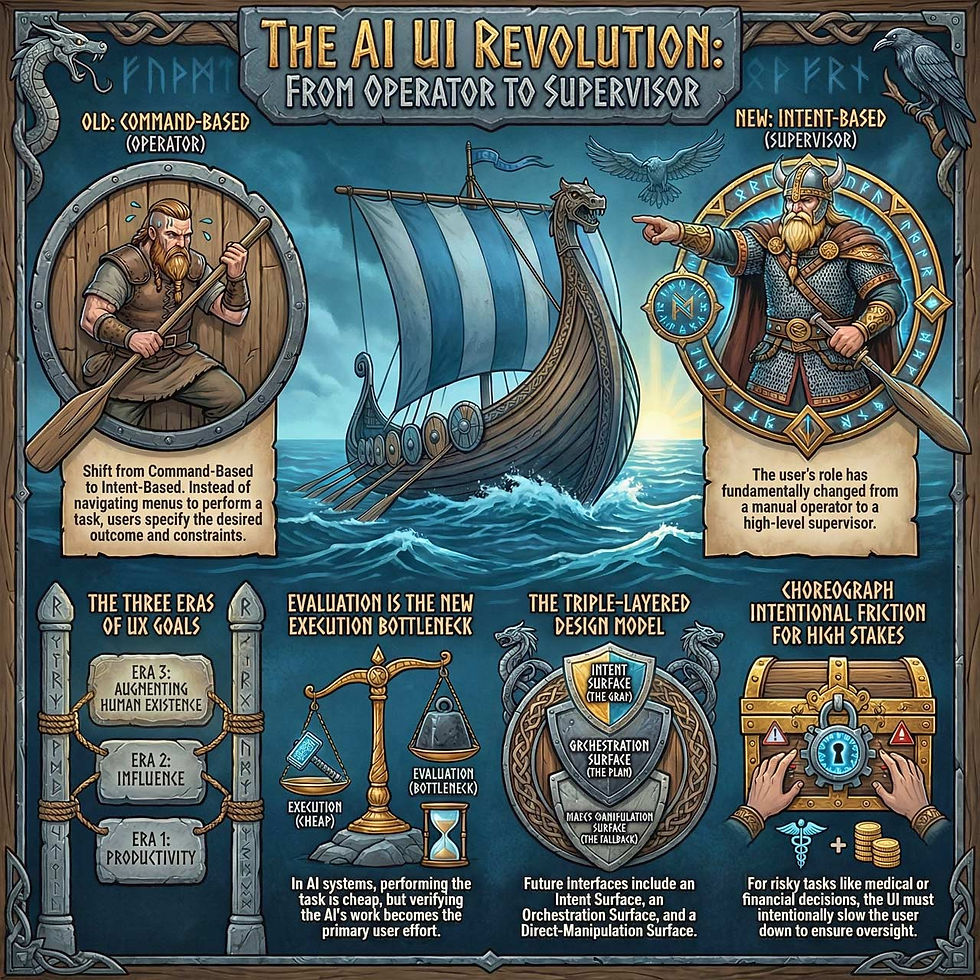
Summary infographic. (NotebookLM)


